
The term “Shell” has always been around while we talk about gaining access to those machines that have an Operating System running on their hard drives. Having said that, it is understood that a machine here could refer to a simple Personal Computer, a Laptop, a Server or a Cloud Instance for that matter. For such machines to be used by humans, a certain interface is necessary which would act as a bridge between the user and the computer.

While such an interface is in place, it could be of two types –
- CLI (Command-Line Interface)
- GUI (Graphical User Interface)
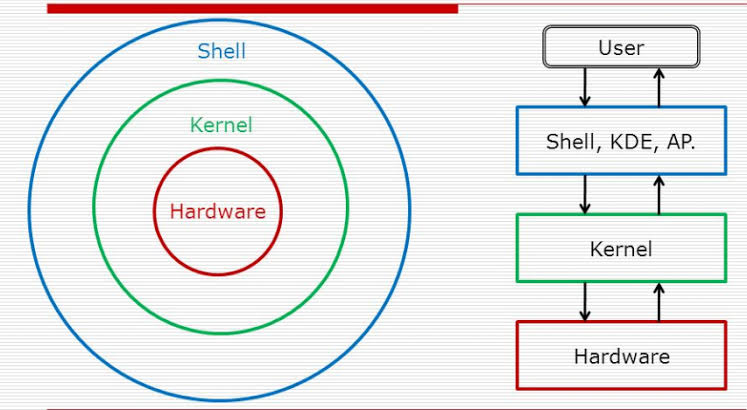
Both the types of interfaces are available to all the end users; however, it depends on the user whether they would prefer the CLI or GUI access. The CLI uses ‘Shell’ commands that are understood and interpreted by the Shell based on which the Kernel (the core of an Operating System) schedules the tasks to the core processor, hardware components in a language they understand – the machine level codes/binary instructions. In contrast, the GUI is a very easy and smooth way of accessing the applications and resources by interaction using mouse, keyboard, etc., where the inputs are simple click, drag and drop kind.
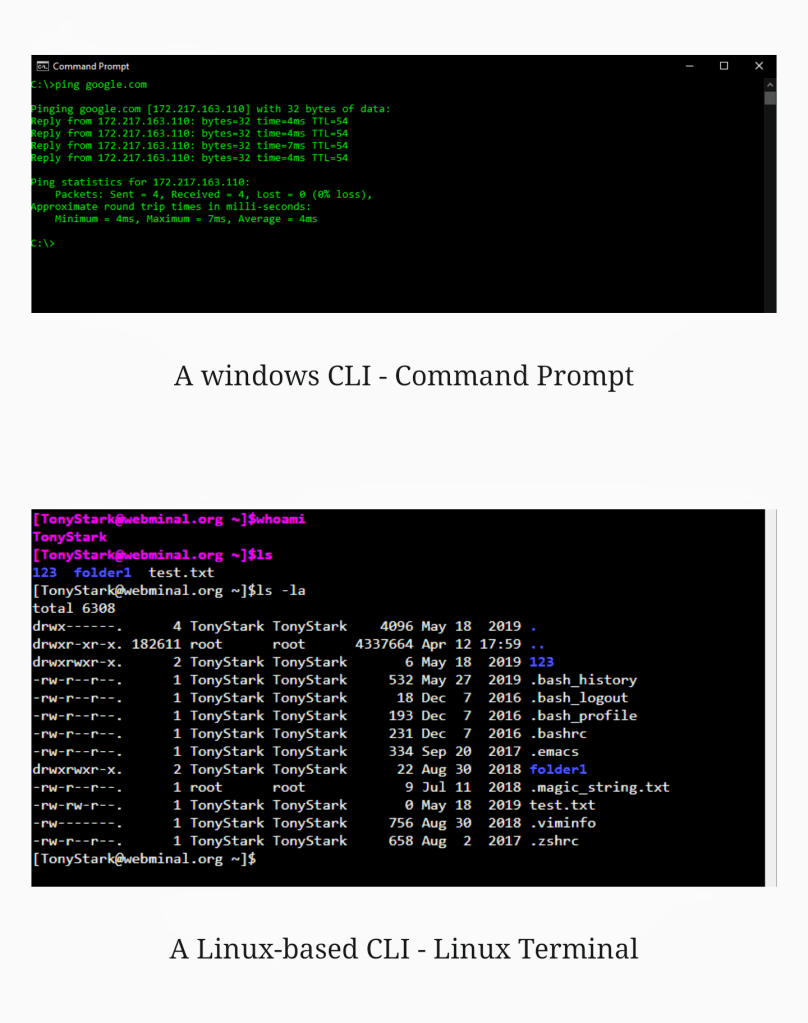
However, it is to be noted that the operations such as Copy/Paste, Move or Delete using CLI interface is faster as compared to GUI. The reason being that the CLI instructions help in complete elimination & bypassing of the Desktop Environment (such as GNOME, MATE, KDE, etc..) interaction which saves the processing overheads.
A Shell simply gets the commands for all the tasks from users and interprets them to the Kernel understandable format and the Kernel in-turn sends the task signals to the device drivers and hardware components to complete the task. Hence, Shell is the outer most user interactive part of the OS and Kernel is the actual core OS component which performs the core job. To put it simply, for instance, when a user uses the mouse to click or drag & drop (GUI) on a particular file from directory A to directory B, a mouse click event is created in the runtime Desktop Environment which could be compared to a command running behind the scenes at the shell level that instructs the Kernel on the required actions to be performed.
Why Shell access?
A shell access is possible when the applications such as “Terminal” (in case of Linux flavors) or “Command Prompt” (cmd.exe in case of Windows flavors) help users to input shell commands to access the machine (in scenarios where Desktop Environment is not preferred/installed). The alternate way of access is the Secure shell (SSH) access in Linux where users from one machine can take an SSH session to a remote server/machine allowed without the need for physical log-in to the system. This access is ideally enabled as a service via port tcp/22 for SSH which is an encrypted communication (after Encryption Key negotiation) unlike the plaintext Telnet communication via port tcp/23 (TELNET) as an example. This SSH access will help to remotely have the Terminal window opened to access the target machine via CLI. This typically helps the network and System Administrators to remotely manage the machines across the organization.
However, it is to be noted that the authentication using credentials, authorization to the resources (files and directories) with role-based access privileges are still the same in either cases. Typically, a Secure Shell access is compared to a Client-Server model where the secure shell is established and the path is encrypted by sharing SSH keys between the client and the server.
Different types of Shell Access
Now we have discussed what is a shell and how it helps in connecting with remote servers and devices over the allowed network. Though the shell access is helpful & used for remote server/system administration, there are always two sides of a coin and it applies for this shell access as well. While the idea is to establish connectivity to the remote machines, the same could be used by malicious attackers to gain access to vulnerable, unauthorized systems thereby launching attacks on the machines/network. Based on the method in which the connectivity is established between the source machine and the target machine, we could categorize the Remote Shell access into 2 types as follows.
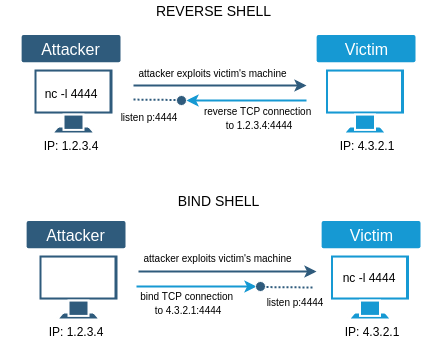
- Bind Shell – A bind shell access works like a forward proxy connectivity where the source machine is trying to connect to the target machine as in a Client-Server model. Let us consider an attacker’s scenario for better understanding. For instance, an attacker’s source machine ‘A’ tries connecting to the target victim machine ‘B’ inside an organization which would be listening for inbound connections from the attacker by opening a communication port/listener.
In this case, the organization will have Firewall where the private IP of the target machine is bound to a public IP NAT. This makes it difficult to reach to the target victim machine placed behind the Firewall NAT. Also, security controls in an organization would include zone Firewalls, IDPS (Intrusion Detection & Prevention Systems) which would continuously monitor the inbound traffic for malicious connections from suspicious IPs trying to connect to random ports with malicious payloads in the data packet.
Hence, malicious Bind Shell communications are kind of noisy as they are easily detected by the Firewalls and other intrusion Detection/Prevention systems, thanks to the deep inbound traffic inspection.

In this picture for Bind Shell comparison, the Bee is the Attacker looking for vulnerable target (Honeycomb) listening on a known static IP address on fixed port where Attacker needs to put effort to identify a sure-shot target.
Whereas, for a Reverse Shell, the Attacker (Bee) will be waiting for the Victim (Honeycomb) to automatically connect to the Attacker who is listening on a specific port and Host IP address which are static in nature. However, in either of the cases, it is the wit of the attacker to drop a malicious payload into the victim machine & to execute it.
- Reverse Shell – To overcome the shortcomings in Bind Shell based exploits, as a workaround, attackers utilize the Reverse TCP shell concept. The Reverse shell makes an attacker’s machine the listener (or simply, the server) which waits for inbound connections from the target host on a specific port. For this reason, the Reverse Shell is also known as Connect-Back Shell.
This eliminates the problem of cracking the Firewall NAT configurations at the target machine’s network. Since the access works in the reverse order as compared to Bind shell, this is called the Reverse Shell access where the attacker listens on a specific port instead of the victim/target machine.
Once the victim’s machine is exploited, the attacker tries to gain persistence which is achieved by invoking scripts in the victim machine to initiate the outbound traffic to the remote attacker’s machine from a malicious process disguised to be legitimate. This is taken care by the exploit code or the malware that runs on the victim machine. Here, the attacker would have a Public routable IP address & statically listens on the specific port and the victim machine could use any of the available source ports though the session is initiated by the victim machine from behind the NAT (or the Firewall).
As we now know, the major difference between Bind Shell & Reverse Shell is that the Attacker listens on a specific fixed IP Address & port number in case of a Reverse Shell access; and the Victim listens on a fixed IP Address & port number in case of a Bind Shell access.
What could possibly go wrong?
Post successful gaining of a Reverse Shell on the victim machine, the attacker is literally capable to take over the entire machine. Further with the reverse shell access, an attacker can upload multiple scripts into the victim machine to exploit other vulnerabilities, steal credentials, convert the target machine into a bot which communicates to the Command-and-Control server (attacker’s machine) as a member of the botnet cluster to unleash a potential DDoS attack.
Also, the attacker might leverage this reverse shell access to slowly try lateral movement into the network by escalating privileges and creating users (local accounts or domain accounts) within other machines. Imagine the impact it would create if the attacker could gain access to a Domain controller and manipulate the Active Directory on a Windows server by running PowerShell scripts. This would become a chaos when the attacker can create, modify, delete users/groups or edit the GPO (Group Policy) which could wreak havoc within the organization. There are n-number of ways an attacker can exploit the reverse shell persistence once gained.
What are the odds?
Now the question is on how the victim machine will initiate the reverse shell connection by itself. Obviously, nothing happens by itself. The answer is that the attacker should identify a vulnerability in the victim machine to initially plant the exploit code. This could happen by leveraging any vulnerability in the OS version, vulnerable package, vulnerable version of framework used or any other vulnerable software on the target machine, web applications or other social engineering methods to drop malicious payloads, scripts or malware onto the target machine.
Few example scenarios include –
- Installing & running a pseudo-genuine software (for instance, a Python script wrapped to appear legit) by tricking the victim into connecting a USB drive to his machine via social engineering techniques,
- File opened by victim from phishing emails containing Trojans,
- Remote Code Execution (RCE) vulnerabilities in the OS, related packages or web applications, etc.
Basically, the mentioned remote shell exploit methods could broadly be categorized as follows.
- Web application-based entry points – this is when the web portal/application contains a vulnerability which could be exploited to create a backdoor within the application over HTTP/HTTPs using which a remote shell access could be gained. A perfect example would be the RCE vulnerability in the application.
- Network-based entry points – where the reverse shell payload is to be dropped into the target machine by some social engineering methods or exploits over the network. This broadly covers almost the rest other ways spared by the web application-based backdoor creation.
Based on the above methods, in the next blog post, we shall explore few of the different tools and techniques available to gain a Bind/Reverse Shell access.
Until next time! 🙂
 Tech Dumpster
Great
LikeLiked by 1 person
Thank you! 🙂
LikeLiked by 1 person
Wow Great ‘Tony has a heart’
My take aways!
1. I understood why we need to go for CLI instead of GUI
2. Diff btw bind shell and reverse shell
3. what are potential threats
LikeLiked by 3 people
Thank you and keep exploring! 🙂
LikeLiked by 1 person