
Cumulus, Cumulonimbus, Stratocumulus and the list goes on and on. Wondering what these names are? Those are the types of cloud formations on the sky visible from anywhere in the world! It has always been a surprise and excitement to talk about clouds. Blurry childhood memories where we used to look up at the sky and wonder what is the shape of the cloud. I, as a young boy, have seen multiple shapes of the cloud which resembles the silhouette of various objects & creatures like a Kite, Tree, Lion, Dinosaur, Snake, etc. All those childhood memories and excitements still continue to sustain when it comes to Clouds – except that now it is a different Cloud altogether.
Quickly crawling into the Cloud technology that has reached an epitome of computing & infrastructure business today, cloud computing has become a part and parcel of small, medium & large-scale businesses in one way or the other. To better understand the pivotal role of Cloud computing, it would be reasonable to roll-back and start things from the scratch such that we get familiar with the evolution of Cloud computing over a period of time to what it is today.
Most of the technological advancements today have had their roots from the military and defense backgrounds where they have been incubated and later became available to the entire outside world. TCP/IP protocols, the internet, dark web, Tor browser and of course, “Cloud computing” have all been the brain child of defense operations (majorly in the US).
To put it in simple terms, “Cloud” is nothing but a physical space – a larger estate of physical servers/server farms that are used to provision a leased computing resources/storage spaces to the users who probably find it difficult to afford their own servers and its maintenance. This comes handy with the benefit that it is available for the beneficiaries at anytime, anywhere and to anyone who has the access to them.
Talking about the need to move to Cloud based solutions, it is necessary that we understand the benefits of migrating to Cloud services rather than sticking on to our native on-premise deployment models.
The benefits of migrating to Cloud services include HA (High Availability) – geographical distribution & global accessibility, cost effectiveness and much more. Cloud is globally accessible, available round the clock to end users and having said that, it is a hidden fact that this demands a pre-requisite – The Internet. All the CSPs provide users the access to their Cloud instances which consumes bandwidth over the internet which is proportional to the amount of data that is transferred inbound and outbound.
Cloud Service Providers – CSPs – The bigger picture
From the initial days till date, Cloud technology has drastically evolved to accommodate every need of the users – both in terms of Computational power & storage spaces. CSPs such as AWS, Azure, Google Cloud, Cloudflare, etc., use their own products and architectures to provide competitive solutions and features such as Cloud storage, Auto-Scaling, Access Management, Encryption, Security, Log management & Monitoring, etc.
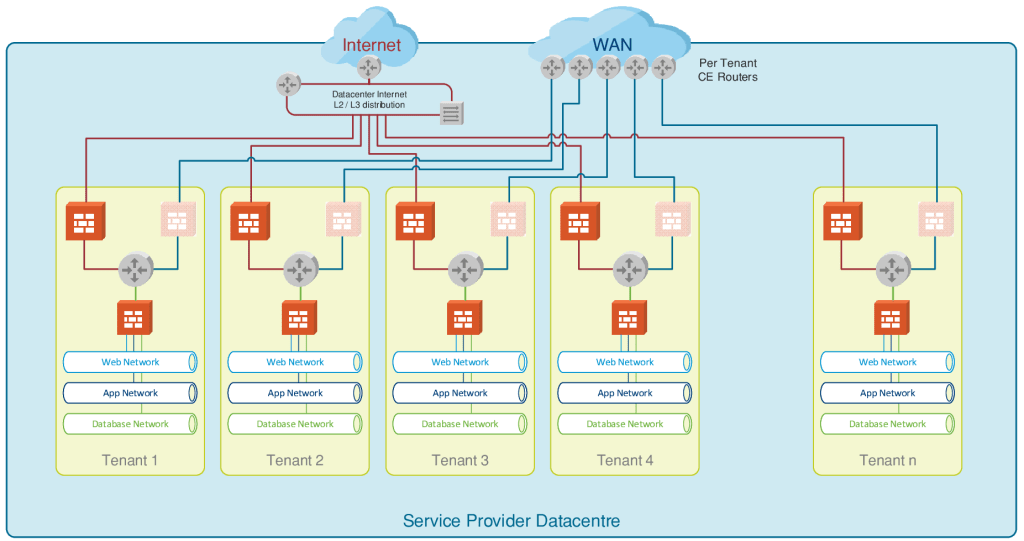
The CSPs provide discernible differentiation among multiple customers wherein accommodating all of them under a “multi-tenancy” model. In a multi-tenancy model, each customer is allocated individual server cluster or server-racks/blades where the segregation is defined between each customer within the same data-center.
All the organizations that require servers to manage & manipulate data, would have to deploy them with costs incurred to procure the servers, for installation and configuration of the servers to cater the needs of the organization. It also extends further to the maintenance of these servers without any impact to production and not to mention the need for able & technically sound man-power to handle these operations seamlessly.
To get the better of all such challenges, organizations migrate to and rely on the CSPs (Cloud Service Providers) to take care of all the management and maintenance, providing them with a solution to all their needs.
Virtualization layer
A user can opt for multiple servers and the same is achieved with the required features and efficiently managed by CSPs with the help of technologies such as Virtualization. It is to be noted that virtualization plays a predominant role in Cloud computing where the resource/server allocation is managed by a sophisticated base operating system such as a Hypervisor where each new server spinning up is considered to be a guest machine running on the host machine. The hypervisor has two types of deployments viz.,
- The Bare-metal Architecture – mostly used by CSPs to manage multiple cloud server instances. A high configuration physical server with the CPU & supporting hardware will run the Hypervisor, e.g. – ESXi (VMware vSphere client-server model), on top of which the VMs (Virtual machines) will run as virtual servers/computers. These VMs are allocated to each user and these users will in turn use these Virtual Servers for their needs by installing OS of their choice & needs.
- Hosted Architecture – a perfect example for the hosted architecture model would be the VMware workstation or the Oracle VirtualBox that we install on our laptops/desktops to run guest Operating Systems instead of going for a dual-boot option. This helps to run multiple OS/virtual guest machines on a single base OS host machines utilizing the same hardware and storage.
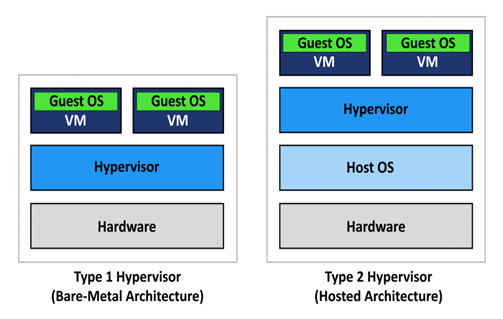
This way, CSPs utilize their physical resources by dynamically allocating virtual servers also known as Server Instances. Hypervisors work similar to an OS where they communicate with the kernel and hardware components which helps to provide resource extensive scalability and other Cloud features.
Cloud Services & models
Cloud services in today’s world play a vital role in elevating businesses – both small scale and large scale. Organizations and individuals use the Cloud computing services to distinguish the various types of Cloud platforms, let us begin with the broad categorization of Cloud deployment models as follows.
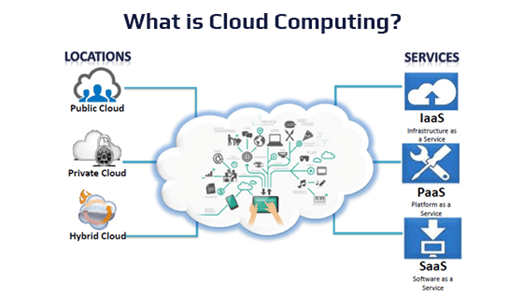
- Public Cloud – the vastly used typical cloud computing model available for minimum or no cost depending upon the resource consumption. All the CSPs today are public Cloud models where users (both individuals as well as organizations) can opt for required services. Amazon Web Services (AWS), Microsoft Azure Cloud, Google Cloud platform and other free storage spaces available over the internet such as Google Drive, Dropbox, etc., are all public Cloud deployment models. However, this public cloud model is not limited to just storage spaces alone. As we had discussed earlier, Cloud computing provides platform for resource utilization, to spin-up and manage servers (virtual server instances) under a multi-tenancy model which is the booming business today.
- Private Cloud – as the name suggests, these are the cloud services deployed and managed by private organizations to cater the business needs of the organization. Being a self-service model, it helps in providing privatized scalable solutions which could accommodate the requirements to deploy new servers, platforms for project/business enablement within the organization or to their customers internally.
This model greatly bridges the gap in the time & resource consumption for the organizations which clearly discerns from the physical on-premise deployment models which is tedious and one needs to start afresh from the scratch to complete a server spin-up. The discernible difference here would be the fact that the effort, time & money spent to procure a new server, install them physically on a DC (data-centre), allocate IP address and further in some cases, integrating them with AD (Active Directory) & Domain Controller for the GPO (group policy)/OU (Organizational Unit) additions (in case of windows). Unlike the on-premise solutions, servers could be centrally managed in terms of virtualization as a viable workaround.
- Hybrid Cloud – it is a combination of two or more cloud deployment models such as on-premise, private or public cloud deployments based on the business need.
The hybrid cloud deployment model comes into picture to serve certain on-demand business needs. For instance, consider an e-commerce website managed by a private organization and the website is hosted on their on-premise or private cloud server. In the event of some flash sale or campaigns being announced, the website anticipates increased number of hits from a number of users which the current hosting setup might not support. In such exceptional cases, organizations go for a concept called cloud-bursting, where the internal hosting setup/private cloud bursts out to a public cloud provider to utilize the computational resources on an on-demand paid basis.Similarly, there are other scenarios as well where the hybrid cloud model is used. To name one, there are certain needs/organizational decisions made to host business critical and sensitive information within the private-cloud/on-premise of the organization wherein cloud-bursting to public cloud providers to manage non-critical applications and non-sensitive information for hosting.
Cloud Services
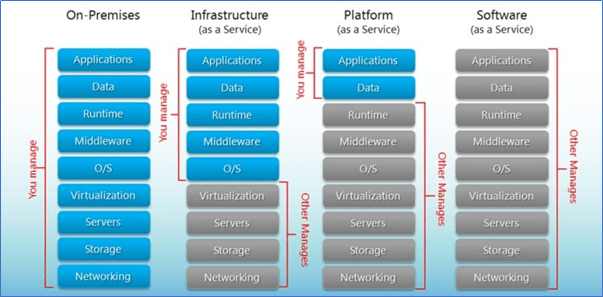
Granularizing the Cloud deployment models to better understand how the Cloud services are offered and opted, let us further dig into the Cloud service models and understand who manages what. As the name suggests, the services offered by the CSPs are segregated from those which are managed/used by the Cloud customers.
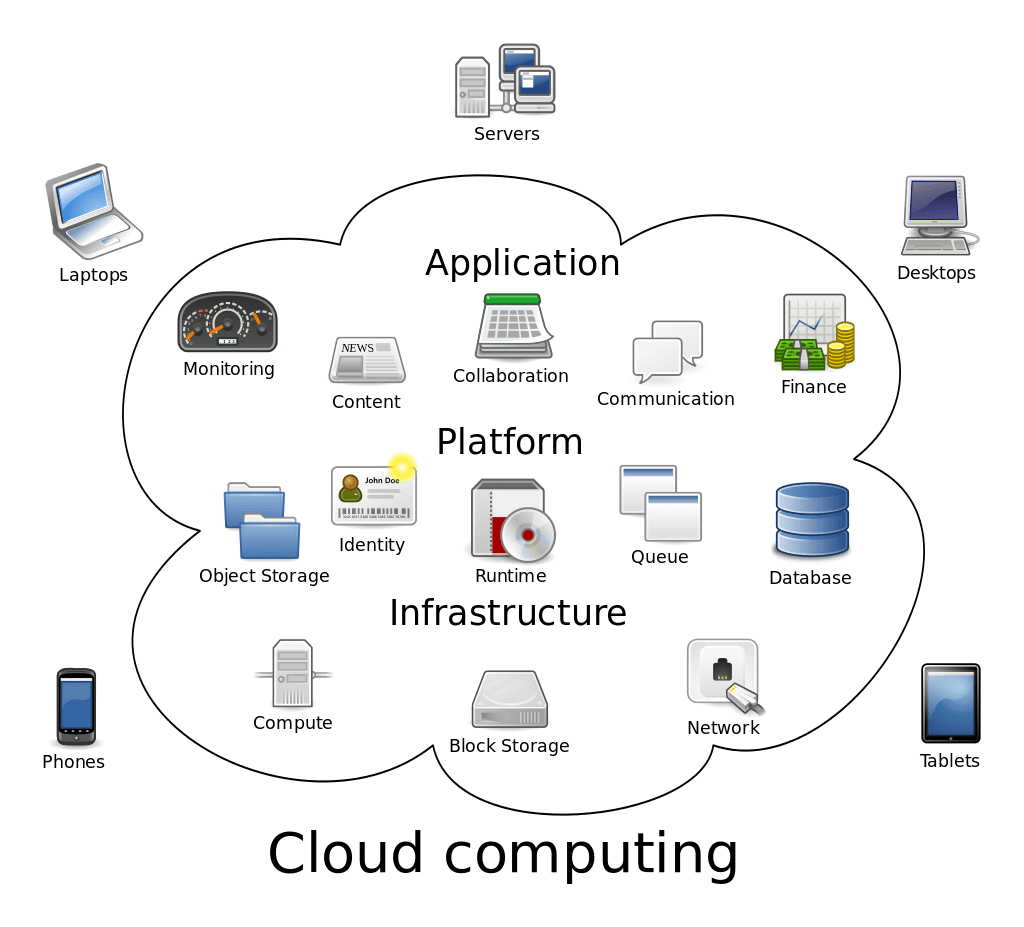
- IaaS – Infrastructure as a Service provides the hardware and other networking services which are managed by the CSPs themselves. In this type of service, the hardware and other resources are provided by the CSPs and we only choose the configurations for our infrastructure. For example, AWS provides EC2 instances where we can choose the processor capacity, RAM, etc for which we are charged to make use of these computational resources and power. On top of these servers which are actually managed by AWS, we can host our web applications. To put it in simple terms, all the hardware related issues, load-balancing, VLANs, and their maintenance are taken care by AWS and clients only need to pay for the resources they avail. However, IaaS requires a bit of more technical expertise to choose and build the hardware level infrastructure.
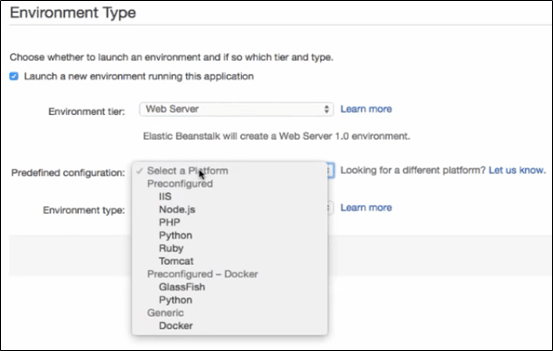
- PaaS – Platform as a Service is one which most of the organizations prefer for development and deployment of applications with ease. This service type could be related similar to the PnP (Plug-n-Play) kind of VM images/Virtual appliances (which relate to the platforms here) where the. ova or .vmdk files are run by the Virtual applications such as VMware Workstation. AWS Elastic Beanstalk is a better example for PaaS, as the client gets to directly jump into the type of framework or developing tool that they are going to work on. This saves all the ambiguity in starting from the scratch where the user/client would have to build their own infrastructure and OS. As a matter of fact, all the hardware and infrastructure requirements come in handy and the user can quickly start focusing on the development part without the need to worry about managing the hardware components. Below is a snip of AWS Elastic Beanstalk where the user gets the control to select the “Predefined configuration” for the type of framework he/she will be working on.
- SaaS – Software as a Service is completely a third-party managed application where the client/organization is merely a user with authentication and authorization provided to make use of the services pertaining to that application. Here, the infrastructure (hardware) and the application (software) are managed by the vendor. The client only has a front-end view/access to the services offered by the vendor. Gmail is considered as SaaS. We do not own the application but we use the services which are provided by Google.
Threats within cloud deloyment
After all the evolution, deployment model architectures and services provided by the Cloud services, it is evident how complex the Cloud business is. There are no direct controls on even the resources which are allocated to us. CSPs follow strict anonymity policies to ensure that their data centres are sufficiently isolated from direct physical accessibility. Though this could help secure the cloud resources, it also makes the picture partially opaque for the users/clients/organizations.
The major threat to Cloud services is the collaboration of multiple technologies which requires effective resilience and management capabilities instilled to ensure they are fail-proof and fail-safe when required.
Further to the amalgamation of multiple technologies, it is also to be noted that the CSPs manage millions of data within few data-centres where n-number of users and their data are stored/managed within the same physical servers. Any compromise/data breach of one customer should not affect the data integrity and confidentiality of the other.The above are some of the many major challenges CSPs face today where all business critical and sensitive information are migrated to the Cloud storage containers.
Security measures & best practices
To overcome all the security threats that rest within the Cloud services, CSPs and customers are constantly working on security enhancement policies and processes to bring out robust security defence mechanisms against potential threats such as hackers and data theft.
It is essential that any CSP should understand the baseline of Information Security which is the CIA triad – Confidentiality, Integrity & Availability. The user data should, at any point in time, be protected from loss, breach or theft either intentionally or due to ignorance.
Such data needs to be categorized based on the level of sensitivity, severity and accessibility. The data could be secured in different forms based on the data at rest, data in transit and data in use. The Data at resthereis simply the Cloud storage space, such as the AWS S3 bucket, where the data is to be securely retained for the stipulated timeframe without any harm, changes or loss of data in any unauthorized manner. Also, it is to be ensured that the sensitive data stored is always hashed using strong hashing algorithms.
While we talk about the secure storage of sensitive data, deletion of such sensitive data as and when no more required is equally important. Cloud computing involves data archiving and storing of data in multiple locations for HA purposes. Such features become a major concern when the encrypted data needs to be disposed.
Crypto-shredding is a technique or practice where the encryption keys pertaining to the encrypted stored data are deliberately shredded randomly to an unrecoverable state in order to make it highly impossible to recover those keys to decrypt the sensitive data.
Data in transit needs to have an end-to-end encryption mechanism to ensure that the transferreddata does not experience any MITM or sniffing attacks. This could be implemented using the SSL/TLS mechanisms in case of HTTPs communication.
Apart from protecting the data using various mechanisms such as Network ACLs, VPCs and other network level protections, it is also advised to follow several security best practices as below.
- Deploy DLPs (Data Loss Prevention) to monitor cloud security and sensitive information. Example – Zscalar, CASB (Cloud Access Security Broker), etc.
- Conduct periodical Cloud Audits and compliance reviews – ISO 27001 / PCI audits / HIPAA / GDPR etc.
- Perform Security reviews and assessments such as Vulnerability Assessment and Penetration Testing.
- VPC – Virtual Private Cloud – Re-iterating the multi-tenancy model acclimatized by the CSPs and the data of multiple customers stored within the same data centres, it is a serious concern when it comes to data privacy and secure storage.
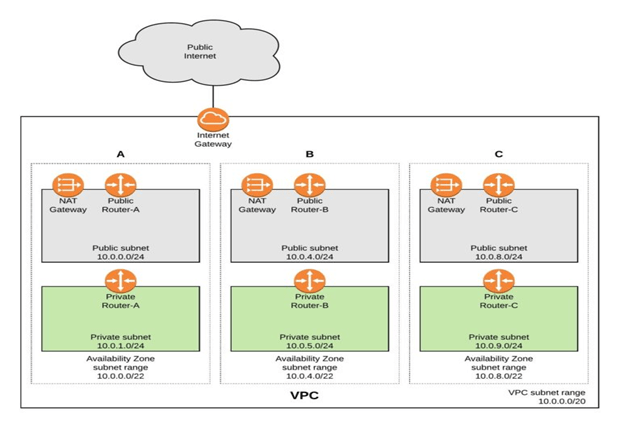
This shortcoming could be overcome with the concept of VPCs (Virtual Private Clouds) where each customer is allocated a physical as well as a logical separation of the hardware and software resources within their purview from rest of the customers. Below is a pictorial representation of how AWS VPC effectively accommodates multi-tenancy model by segregating each customer by a separate cloud infra VPC – A, B & C.
From the above snip, it is to be noted that each VPC acts as a separate data-centre which can run multiple EC2 instances as a whole. This VPC configuration benefits with the Static IP addresses assigned to the instances apart from the public internet IP.
Alongside, VPC also provides to configure Security Groups, VPNs and Network ACLs to manage firewall like configurations for securely encrypted inbound/outbound filtering. These security groups could be mapped to the instances of our choice to act as a firewall.
2. IAM – Identity Access Management
All the network level security and segregations aside, once the users have access to the Cloud instances, it is also essential that the users are identified, authenticated, authorized and allowed to make changes/modifications only based on their role. Using AWS IAM, role-based access matrix could be defined to allow privileged user access to specific resources. Access to the critical assets should be restricted based on user roles and privileges using granular level controls. In case of AWS IAM, users and groups could be created to restrict role-based access to various users.
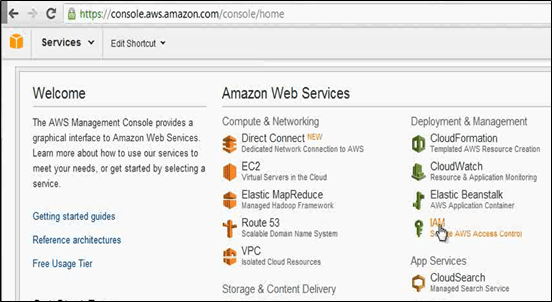
Using AWS IAM, role-based access matrix could be defined to allow privileged user access to specific resources.
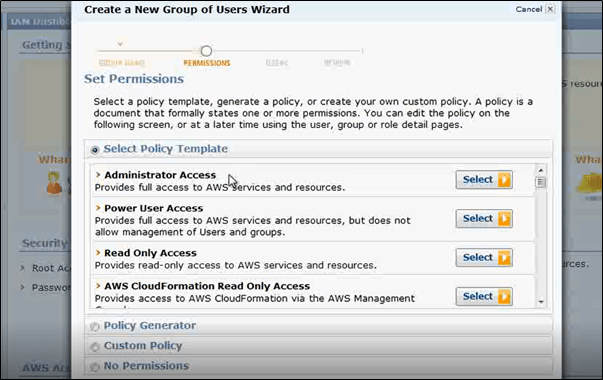
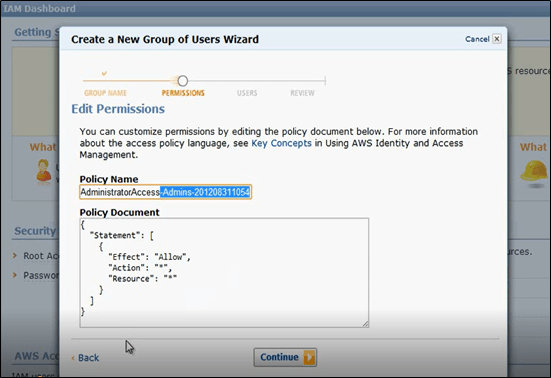
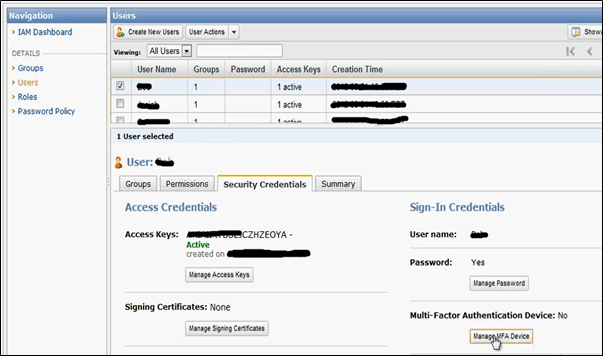
In addition to the IAM users and groups in AWS, Multi-Factor Authentication is an effective way to instigate an additional layer of security such as registered mobile device OTP on top of a user credential-based authentication.
3. Access key ID & Secret Access Key
While defining users and roles using the IAM, the user access to resources are provisioned using the AWS Access keys. The access key pair consists of an Access Key ID and a Secret Access Key which is similar to the username and password combination. This AWS access key pair could be used to authenticate while using AWS CLI commands or while using the AWS API for HTTP/HTTPs based communication protocols. The below are the few API parameters of S3 bucket that are sensitive to securely authorize and authenticate a particular IAM user.
| ‘s3’, | |
| aws_access_key_id=access_key, | |
| aws_secret_access_key=secret_key, | |
| aws_session_token=session_token, | |
| region_name=’us-west-2′ |
4. Cloud services & API testing
While we talk about the penetration testing and vulnerability assessment over on-premise devices to ensure security robustness which is relatively easier to get accessibility to the scope of devices, it is a very tedious process to get access to the cloud models especially SaaS based models.
There may be scenarios where the cloud services are used by organizations which might fetch data from different components. For instance, let us consider a set of network devices whose performance needs to be monitored by fetching SNMP traps. These SNMP traps would be collected from various devices and stored in an SNMP server. To populate the performance monitoring on a web console, we could make use of an API engine to push these data to the application server in cloud (SaaS model). This transaction could be done by sending API calls to the web server which could be configured to consume the APIs using the authentication tokens sent to authorize the end users.
API testing has become critical recently as most of the web and mobile applications make use of API calls to communicate with the peering components (web/DB servers, Containers, etc). Though the API calls ease out the data transaction between client and server, it requires a lot of scrutiny on how the APIs are implemented when sensitive data transaction is involved.
Due to the easily understandable nature of the APIs, it is possible that they can be exploited by an attacker/malicious user to sniff the traffic and gain some juicy information. In order to secure these API calls, we use various security best practices and API security testing.
- Fuzz testing – where random unintended/unexpected values should not be accepted by the API. Such values should either be rejected at the client side or the server should respond with generic error response page.
- Command injection – where the API parameter (key-value pair) should not accept any OS commands which might get executed on the server.
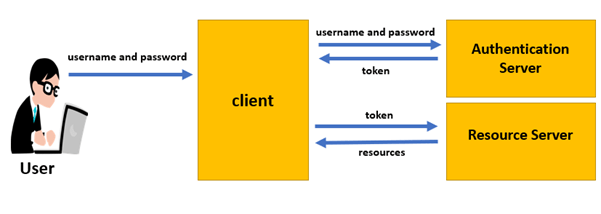
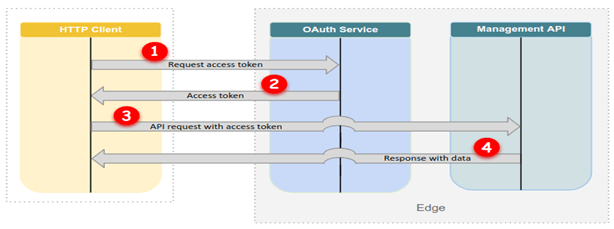
Apart from the API security testing, it is also important that the API implementation is reviewed. The authentication and authorization of each user session must be properly managed. There must be proper encryption, authentication mechanisms used such as SSL certificate-based authentication where the private key exchange happens to encrypt/decrypt the traffic. Apart from SSL based authentication, OAUTH 2.0 token-based authentication is also used for improved security assurance.
Cloud Forensics
Every time we talk about forensics, the granular level artefacts and evidences are the most predominant aspects. The major objective in digital forensics is to determine the source of evidence, replicate the critical evidence, preserve it and perform further forensic analysis on the replica.
When it comes to cloud forensics, as we had discussed earlier, the building blocks of the cloud environment are the virtual server instances and containers. These VMs are run on top of the hypervisors and hence it takes a lot of determination to identify where the infection has occurred. Once the particular instance is identified as of where the point of entry or compromise has happened, the affected instance can be taken a snapshot of for further analysis.
In case of AWS, these virtual hard drives are called the Elastic Block Store (EBS) which could be replicated into snapshots for further forensic investigations. These EBS volumes are similar to that of the physical hard disk drives on a workstation.
The EBS volume, which is now the evidence, could be mounted to another instance such that this mounted partition/volume could then be used for the forensic analysis by extracting the memory dump. Effective tools to perform the malware forensic analysis include – Volatility Framework, Rekall Memory Forensics Framework, etc.However, there comes the complex part as the cloud providers need to provide access to even perform an RCA (root cause analysis) to identify the exact cloud instances (or the EBS volumes to be precise) on which the service was running and was compromised.
Challenges in Cloud Forensics
As mentioned above, digital forensics has always been the root cause analysis to identify the exploit and techniques used to compromise a victim system. It has always been a challenge to identify, replicate, preserve and analyse the artefacts and determine the IoCs. When it comes to Cloud services, it becomes furthermore cumbersome due to the delegation of data over the Cloud data centres.
As discussed earlier, CSPs use various techniques to provide High Availability for user data using multiple cache servers and CDNs (Content Delivery Networks) where the data stays into the memory somewhere in archives or slack spaces. These data sources are complex to be identified by a Forensics investigator and even when identified, it is even more challenging to gain access to the resources that hold the residual data which could aid the forensic investigation.
Despite all the challenges in the Cloud forensics, there are certain guidelines provided by CSPs such as AWS to have access to their instances and resources. Moreover, there are also geography-based laws that apply to the distributed servers which hold the same data but are deployed in different geographical regions.Overcoming all these hurdles, once the access has been attained from the CSPs, data could be replicated, preserved and further examination can be carried out on the replica to identify the IoCs in case of any malware attack or system compromise.
Cloud monitoring / Log management
Organizations and CSPs are implementing humongous security defences against potential threats and attacks which, nonetheless, need a third eye to keep a track of the activities and behaviours. To continuously monitor the activities, it is necessary to deploy log collection of inbound and outbound traffic such that any suspicious behaviour is detected and immediately acted upon by the SIRT (Security Incident Response Team). There need to be a centralised log collector from which an intelligent Security system should analyse the data at all layers. There are various Cloud based services offered such as the AWS CloudFront, CloudWatch and other features to push the logs to a centralised dashboard console and monitor them.
Conclusion
Conclusively, Cloud computing has taken over the IT industry in terms of hardware and software which is booming at an alarming rate that organizations have started adopting to them without a complete expertise of the domain. It is very much necessary to take these technologies seriously in order to secure our infrastructures and data which would otherwise cause chaos and massive security breaches. In order to stay secure, it is imperative that we implement and follow certain security good practices and measures to minimise any potential threat to business and corresponding information.
Thanks for your time to read! Please feel free to share your views & comments!! 🙂
 Tech Dumpster
Excellent post👌👌
LikeLiked by 1 person
Thank you “iamkarthij” ! 🙂
LikeLike
Currently, I am learning about azure cloud technology. this post is pretty much good to understand the basic of cloud computing.
Thank you
LikeLiked by 1 person